Cloud computing has transformed how businesses build, deploy, and manage their IT infrastructure. Organizations of all sizes have adopted cloud platforms to access flexible computing resources, simplify infrastructure management, and scale applications according to changing business requirements. However, as cloud environments become more complex, many companies are reconsidering whether keeping every workload in the public cloud is the most cost-effective and practical long-term strategy.
This shift has brought cloud repatriation into the spotlight. Cloud repatriation refers to the process of moving selected applications, databases, storage systems, and other workloads from public cloud platforms back to dedicated servers, private infrastructure, or on-premises environments. Rather than completely abandoning cloud computing, businesses are reassessing where their workloads should operate to achieve better cost control, performance, security, and infrastructure flexibility.
For some organizations, continuously running applications in the cloud can result in higher-than-expected expenses. Computing charges, storage costs, data transfer fees, backup services, and additional cloud management expenses can gradually increase monthly infrastructure budgets.
As a result, companies are exploring alternatives such as dedicated server hosting to reduce cloud costs and gain more predictable infrastructure expenses.
The growing interest in leaving the cloud does not mean cloud technology is becoming irrelevant. Instead, businesses are recognizing that different workloads have different infrastructure requirements. Some applications benefit from cloud elasticity, while others perform better financially on dedicated hardware.
In this article, we explore why companies are considering cloud repatriation, the business benefits of dedicated servers, how to develop an effective cloud exit strategy, and why hybrid infrastructure is becoming an important approach to modern IT management.
What Is Cloud Repatriation?
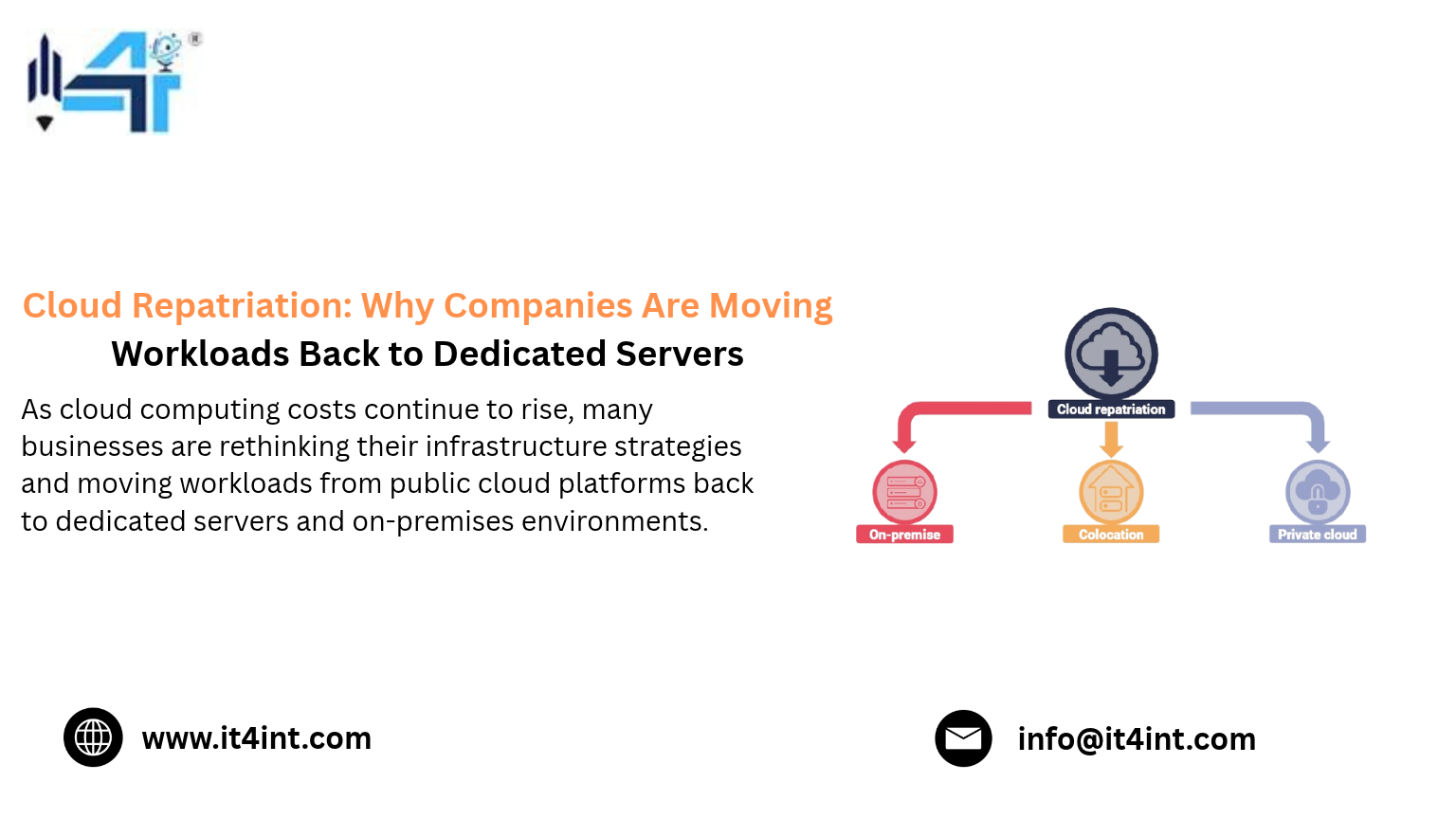
Cloud repatriation is the process of transferring workloads from public cloud infrastructure to alternative hosting environments, such as dedicated servers, private clouds, colocation facilities, or on-premises data centers.
When businesses initially migrate to cloud platforms, they often prioritize flexibility, convenience, and rapid deployment. Over time, however, their infrastructure requirements may change.
For example, a startup may initially host its entire application on a public cloud platform because it needs flexible resources and minimal hardware management. As the business grows, its application traffic may become more predictable, its database may require consistent computing resources, and its monthly cloud spending may increase. At this stage, the company may discover that operating certain workloads on dedicated servers is more economical. Cloud repatriation allows organizations to move those workloads to infrastructure that better matches their long-term requirements.
Dedicated Server Plans
Power your growing business with IT4INT reliable infrastructure built for demanding workloads, with high performance, advanced security, and flexible configurations tailored to your needs.
What Does Cloud Repatriation Involve?
The process may include:
- Moving virtual machines to dedicated physical servers.
- Migrating databases to dedicated storage and computing environments.
- Transferring application workloads from public cloud platforms.
- Moving large datasets to dedicated storage infrastructure.
- Rebuilding application environments outside the public cloud.
- Establishing backup and disaster recovery systems.
- Integrating dedicated infrastructure with remaining cloud services.
Importantly, cloud repatriation is not always a complete migration away from cloud platforms. Many businesses move only selected workloads while continuing to use cloud services for other applications.
The objective is to create an infrastructure environment that offers the right balance between performance, cost, reliability, and flexibility.
Why Are Companies Leaving the Cloud?
Cloud platforms offer many advantages, but the financial and operational realities of running large-scale cloud environments can differ from initial expectations.
As organizations expand, they may encounter unexpected expenses, infrastructure complexity, and resource management challenges.
Here are the major reasons why companies are considering leaving the cloud for selected workloads.
1. Rising Cloud Infrastructure Costs
One of the biggest reasons behind cloud repatriation is increasing infrastructure spending.
Public cloud providers commonly use consumption-based pricing models. Businesses pay for computing resources, storage, networking, and additional services according to usage and pricing agreements.
This approach is attractive when workloads are temporary or unpredictable. However, organizations running continuous production workloads may find that recurring charges accumulate over time.
Cloud expenses can include:
- Virtual machine and computing charges.
- Block and object storage expenses.
- Outbound data transfer fees.
- Backup and snapshot storage.
- Load balancer charges.
- Monitoring and logging services.
- Managed database expenses.
- Additional networking services.
When several services operate simultaneously, identifying the actual cost of individual applications can become difficult.
Dedicated servers provide an alternative through fixed monthly or contract-based pricing.
For workloads with consistent resource requirements, businesses can allocate dedicated CPU, RAM, storage, and networking resources at a more predictable recurring cost.
This makes dedicated infrastructure attractive for companies looking to reduce cloud costs without sacrificing essential computing capacity.
2. Unpredictable Monthly Billing
Cloud infrastructure costs can change depending on resource consumption.
An application experiencing increased traffic, additional storage requirements, or higher data transfer may generate a larger bill than expected.
Although monitoring and budgeting tools help businesses track consumption, maintaining predictable spending across complex cloud environments requires continuous optimization.
Dedicated servers generally provide more straightforward infrastructure pricing.
Once a company selects its server configuration and applicable services, it can estimate its regular hosting expenses more easily.
This predictability is particularly useful for businesses with fixed production workloads and long-term infrastructure requirements.
3. Expensive Data Transfer and Egress Charges
Data transfer is another important factor influencing cloud repatriation decisions.
Many cloud providers apply charges to certain types of outbound data transfers, depending on the service, region, destination, and applicable allowances.
Businesses operating video platforms, SaaS applications, content delivery services, analytics systems, and large databases may transfer significant amounts of data every month.
These expenses can become a major part of the total infrastructure bill.
Dedicated server providers may offer defined bandwidth packages, included traffic allowances, or specific network pricing structures.
For applications with consistently high data transfer requirements, this can make dedicated infrastructure easier to budget for.
Before moving workloads, businesses should compare actual network requirements, bandwidth limits, port speeds, and potential overage charges.
4. Underutilized Cloud Resources
Cloud platforms make it easy to provision computing resources quickly. However, this convenience can sometimes result in overprovisioning.
Businesses may deploy larger virtual machines than necessary or leave development, testing, and production resources running continuously.
Over time, unused computing capacity can increase operating expenses.
Dedicated servers may provide better financial value when workloads consistently use a substantial portion of available resources.
For example, a company operating a continuously active database may benefit from allocating dedicated processor and memory resources instead of repeatedly paying for equivalent virtualized capacity.
However, businesses should evaluate utilization carefully. Moving a lightly used application to an expensive dedicated server may not produce meaningful savings.
5. Greater Control Over Infrastructure
Cloud platforms abstract much of the underlying physical infrastructure. This makes deployment easier, but it can limit certain hardware-level configuration choices.
Businesses running specialized applications may require greater control over processors, memory configurations, storage systems, operating systems, and network environments.
Dedicated servers provide direct access to physical hardware resources.
This can be valuable for organizations operating demanding databases, virtualization environments, enterprise applications, and resource-intensive workloads.
For these companies, infrastructure control is an important reason to consider dedicated hosting.
Why Dedicated Servers Are Becoming an Attractive Cloud Alternative
Dedicated servers offer a different infrastructure model from traditional public cloud virtual machines.
Instead of renting a virtualized portion of a larger computing environment, an organization receives an entire physical server allocated to its workloads.
This provides several advantages for businesses considering cloud repatriation.
1. Predictable Infrastructure Expenses
One of the most important advantages of dedicated server hosting is cost predictability.
Businesses typically pay a fixed monthly amount or an agreed contract price based on the server configuration and selected services.
This makes infrastructure budgeting easier because basic server rental expenses are not directly tied to every individual computing operation.
Dedicated infrastructure can be especially attractive for applications that operate continuously and require stable computing capacity.
2. Dedicated Computing Resources
A dedicated server provides physical CPU, RAM, and storage resources allocated to one customer.
Unlike many shared virtualized environments, the physical hardware is not divided among multiple customers.
This provides greater resource isolation and predictable hardware access.
For applications that require consistent performance, this can be an important advantage.
3. Improved Performance Consistency
Workloads that depend on sustained processor performance, memory availability, or fast storage may benefit from dedicated hardware.
Dedicated servers can provide consistent access to configured hardware resources without competing with other customers for the same physical CPU and memory capacity.
This is useful for:
- Enterprise databases.
- High-traffic websites.
- SaaS platforms.
- Business applications.
- Data processing systems.
- Virtualization environments.
- Large storage applications.
Actual application performance still depends on server configuration, software optimization, networking, and storage architecture.
4. Greater Hardware and Software Flexibility
Dedicated infrastructure gives organizations more control over their computing environment.
Depending on the provider and server configuration, businesses may be able to select:
- Processor models and core counts.
- Memory capacity.
- NVMe or SSD storage.
- RAID configurations.
- Operating systems.
- Virtualization platforms.
- Network configurations.
This flexibility helps businesses build infrastructure that aligns with specific application requirements.
5. Better Long-Term Cost Planning
For organizations with stable workloads, dedicated servers can offer a more predictable long-term hosting model.
Rather than continuously adjusting virtual machine configurations and monitoring consumption-based charges, businesses can select suitable physical resources and plan infrastructure expenses over longer periods.
However, total cost comparisons must also account for management, backups, redundancy, migration, support, and hardware-related services.
The goal is not simply to find a lower monthly server price. It is to achieve better overall infrastructure value.
Cloud Exit Strategy: How to Move Workloads Without Disrupting Business Operations
Leaving the cloud requires more than transferring files and switching servers.
Businesses must understand their existing architecture, application dependencies, security requirements, and operational needs before starting the migration.
A structured cloud exit strategy helps reduce downtime, avoid unexpected expenses, and protect important business information.
Step 1: Audit Your Existing Cloud Infrastructure
Start by reviewing all applications and services currently running in the cloud.
Identify:
- Active virtual machines.
- Databases and storage systems.
- Network configurations.
- Backup services.
- Application dependencies.
- Data transfer requirements.
- Cloud-native integrations.
- Monthly infrastructure expenses.
This audit helps identify which workloads are suitable for dedicated servers and which should remain in the cloud.
Step 2: Identify Workloads Suitable for Repatriation
Not every application should be moved away from public cloud infrastructure.
Focus on workloads that have predictable resource requirements and operate continuously.
Examples include:
- Production databases.
- High-traffic websites.
- Enterprise applications.
- Long-running application servers.
- Large file storage environments.
- Internal business systems.
Applications that require rapid scaling, serverless functionality, or specialized managed cloud services may be better suited to remaining in the cloud.
Step 3: Calculate the Total Cost of Ownership
Before moving any workload, compare its current cloud expenses with the projected cost of dedicated hosting.
Consider all relevant expenses.
Current Cloud TCO = Compute + Storage + Networking + Data Transfer + Backup + Supporting Services + Management
Dedicated Infrastructure TCO = Server Rental + Storage + Bandwidth + Backup + Management + Redundancy + Migration Costs
Compare both models over 12, 24, and 36 months.
This provides a more realistic understanding of potential savings.
Step 4: Select the Right Dedicated Server Configuration
The server configuration should match the workload rather than simply provide the maximum available resources.
Evaluate:
- CPU performance and core requirements.
- RAM capacity.
- Storage speed and capacity.
- Network bandwidth.
- Operating system compatibility.
- Backup requirements.
- Future expansion options.
Choosing the right configuration helps avoid both overprovisioning and insufficient computing capacity.
Step 5: Plan Data Migration
Data migration is one of the most important stages of cloud repatriation.
Businesses should identify database sizes, file storage requirements, application dependencies, and transfer limitations.
For larger datasets, migration may require staged synchronization rather than a single transfer.
Important steps include:
- Creating verified backups.
- Testing data restoration.
- Establishing secure transfer connections.
- Synchronizing updated data.
- Validating file integrity.
- Testing application connectivity.
Data security and integrity should remain priorities throughout the migration process.
Step 6: Test Applications Before Switching Traffic
Before moving production traffic, test the new environment thoroughly.
Verify application functionality, database connections, storage access, authentication, network configuration, and performance.
Load testing can help identify resource limitations before the system becomes publicly accessible.
Step 7: Execute a Controlled Migration
Use a planned migration window and a clearly documented cutover process.
Where possible, maintain the original cloud environment temporarily as a fallback until the new dedicated infrastructure has been validated.
Monitor performance and application behavior closely after migration.
Step 8: Optimize and Monitor the New Environment
Cloud repatriation does not end when applications start running on dedicated servers.
Businesses should continue monitoring CPU, memory, storage, bandwidth, security events, and application performance.
Regular maintenance and disaster recovery testing are essential for long-term reliability.
Hybrid Infrastructure: Why Businesses Do Not Need to Abandon the Cloud Completely
One of the biggest misconceptions about cloud repatriation is that businesses must move every workload away from public cloud platforms.
In reality, hybrid infrastructure is often a more practical solution.
Hybrid infrastructure combines dedicated servers, private infrastructure, and public cloud services within a coordinated IT environment.
This allows businesses to place workloads where they deliver the greatest value.
How Hybrid Infrastructure Works
Consider a SaaS company that operates several different applications.
It may choose to:
- Host its main database on dedicated servers.
- Run its primary application on dedicated infrastructure.
- Use public cloud services for temporary workloads.
- Store selected backup copies in cloud storage.
- Use cloud-based analytics for occasional processing.
- Maintain disaster recovery resources in a separate environment.
This approach allows the organization to retain cloud flexibility while reducing unnecessary cloud spending on stable workloads.
Major Benefits of Hybrid Infrastructure
Cost Optimization: Businesses can move predictable workloads to dedicated servers while retaining flexible cloud services for variable requirements.
Infrastructure Flexibility: Different applications can use different computing environments according to their technical needs.
Improved Resource Allocation: Dedicated hardware can support demanding workloads, while cloud resources accommodate temporary capacity requirements.
Business Continuity: Properly designed hybrid environments can provide alternative recovery locations and infrastructure redundancy.
Gradual Migration: Companies can move workloads in stages instead of making a complete infrastructure transition at once.
For many organizations, hybrid infrastructure offers a sensible middle ground between complete cloud dependency and traditional on-premises infrastructure.
Which Workloads Should Companies Move from AWS to Dedicated Servers?
AWS provides a wide range of cloud services, and many applications benefit from its global infrastructure and managed capabilities.
However, certain workloads may be more economical to operate on dedicated servers.
The decision to move from AWS to dedicated infrastructure should be based on actual application requirements.
1. Always-On Production Databases
Databases that run continuously and require consistent computing resources may benefit from dedicated CPU, RAM, and storage.
Businesses should compare database licensing, backup, replication, and management costs before migrating.
2. High-Traffic Websites
Websites with relatively stable traffic patterns can benefit from dedicated hosting.
This is particularly relevant for platforms with consistent CPU, memory, and bandwidth requirements.
3. SaaS Application Servers
Mature SaaS applications may have predictable computing requirements.
Moving selected application servers to dedicated infrastructure can help reduce recurring cloud expenses.
4. Large File Storage Systems
Businesses that regularly store and access large amounts of information may find dedicated storage environments more suitable.
However, they must account for backup, redundancy, data protection, and disaster recovery requirements.
5. Virtualization and Enterprise Applications
Organizations running multiple virtual machines or resource-intensive enterprise applications may benefit from dedicated physical servers that support their virtualization requirements.
The most important consideration is whether the workload’s performance, availability, and cost requirements can be satisfied by the proposed environment.
Common Cloud Repatriation Challenges Businesses Should Understand
Although cloud repatriation offers potential advantages, moving workloads back to dedicated servers introduces technical and operational responsibilities.
Understanding these challenges helps organizations plan more effectively.
1. Migration Complexity
Applications may depend on cloud-specific services, APIs, storage systems, or networking configurations.
These dependencies may need to be redesigned before migration.
2. Upfront Migration Expenses
Businesses may need to invest in data transfer, application testing, engineering resources, and infrastructure setup.
These costs should be included in the financial analysis.
3. Infrastructure Management
Moving away from managed cloud services can increase responsibility for server maintenance, operating system updates, security, and monitoring.
Organizations must ensure they have suitable technical support.
4. Backup and Disaster Recovery
A dedicated server does not automatically provide disaster recovery.
Businesses need separate backup strategies, redundant infrastructure, recovery procedures, and regular restoration testing.
5. Scalability Planning
Dedicated servers provide fixed physical capacity.
If application demand increases significantly, businesses may need to upgrade hardware, add servers, or integrate cloud resources.
6. Security Responsibilities
Businesses must maintain appropriate access controls, firewalls, encryption, patch management, and security monitoring.
The security model should be reviewed before and after migration.
By addressing these challenges in advance, organizations can reduce operational risks and build a more reliable infrastructure environment.
How to Know Whether Cloud Repatriation Is Right for Your Business
Cloud repatriation is not the right choice for every company.
Before making a decision, businesses should evaluate their infrastructure usage and long-term operational requirements.
Cloud repatriation may be worth considering if:
- Your monthly cloud expenses continue to increase.
- Your applications run continuously.
- Your workloads have predictable computing requirements.
- Data transfer charges represent a significant expense.
- Your databases require consistent hardware resources.
- You need greater control over server configurations.
- Your business wants more predictable infrastructure budgeting.
On the other hand, cloud hosting may remain the better option when applications experience unpredictable traffic, require rapid scaling, or depend heavily on managed cloud services.
The best approach is to evaluate each workload individually instead of applying the same infrastructure model across the entire organization.
Why IT4INT Server Can Be Part of Your Cloud Repatriation Strategy
As organizations reconsider their infrastructure spending, selecting the right server hosting partner becomes an important part of the transition.
IT4INT Server focuses on server infrastructure requirements that support reliable, scalable, and performance-oriented business operations.
Companies evaluating dedicated hosting as an alternative to selected public cloud workloads should consider their processor requirements, memory capacity, storage performance, network needs, and ongoing technical support.
A suitable dedicated server environment can help businesses establish more predictable hosting expenses while maintaining access to the computing resources required by their applications.
When planning cloud repatriation, organizations should prioritize:
- Dedicated server configurations aligned with actual workloads.
- Reliable computing and storage resources.
- Suitable network and bandwidth options.
- Scalable infrastructure for future business growth.
- Appropriate backup and recovery planning.
- Technical support and infrastructure management options.
IT4INT Server encourages businesses to evaluate their hosting requirements carefully and select infrastructure based on long-term performance, reliability, and cost considerations.
Whether you are planning to move selected workloads from AWS, reduce cloud costs, or establish a hybrid infrastructure environment, a well-planned dedicated server strategy can support your next stage of digital growth.
Looking to move selected workloads from the cloud to dedicated infrastructure? Connect with IT4INT Server to explore server hosting options that align with your business requirements.
Conclusion: Cloud Repatriation Is About Smarter Infrastructure Decisions
Cloud repatriation is becoming an important part of modern IT infrastructure planning because businesses are realizing that public cloud hosting is not necessarily the most economical solution for every workload.
While cloud platforms provide flexibility, rapid provisioning, and powerful managed services, continuously running applications can generate significant recurring expenses.
Dedicated servers offer an alternative for organizations that need predictable infrastructure costs, dedicated computing resources, consistent performance, and greater hardware control.
The growing trend of leaving the cloud should not be viewed as a complete rejection of cloud technology. Instead, it represents a shift toward choosing infrastructure based on actual workload requirements.
For many businesses, the future will involve hybrid infrastructure that combines dedicated servers with public cloud services.
By developing a clear cloud exit strategy, analyzing total cost of ownership, and migrating suitable workloads carefully, organizations can build more efficient and financially sustainable IT environments.
With the right infrastructure planning and a reliable technology partner like IT4INT Server, businesses can take a more strategic approach to hosting, performance, and long-term infrastructure spending.
Read More : Bare Metal vs Cloud: The Real Cost Comparison for 2027