As modern businesses, you must be aware of the fact that a sudden traffic spike holds the potential to turn a successful website into an overloaded server within minutes. That’s exactly where load balancing explained becomes more a networking concept than a practical part of keeping modern applications available.
While a website can perform perfectly under normal traffic, it can struggle when the demand suddenly increases. Be it a marketing campaign, product launch, viral post, or seasonal sale, all calls become content. Especially when demand exceeds the limits of your server’s CPU, memory, network bandwidth, and storage bandwidth, users might experience slow page loads, failed requests, timeouts, or complete downtime. For the same, modern architectures use load balancers alongside auto-scaling, cloud infrastructure, containers, CDNs, health checks, failover systems, and multi-region deployments. As the main goal is to not only build an application that can handle changing demand but also make sure that not a single server is responsible for everything.
Having said that, does load balancing actually make a website faster? What happens when one server fails? Which routing algorithm should you use? How is Layer 4 different from Layer 7, and when does a growing business actually need a load balancer? This guide has load balancers explained, why businesses use them, which types and algorithms exist, and where they fit into modern application architecture.
What is load balancing?
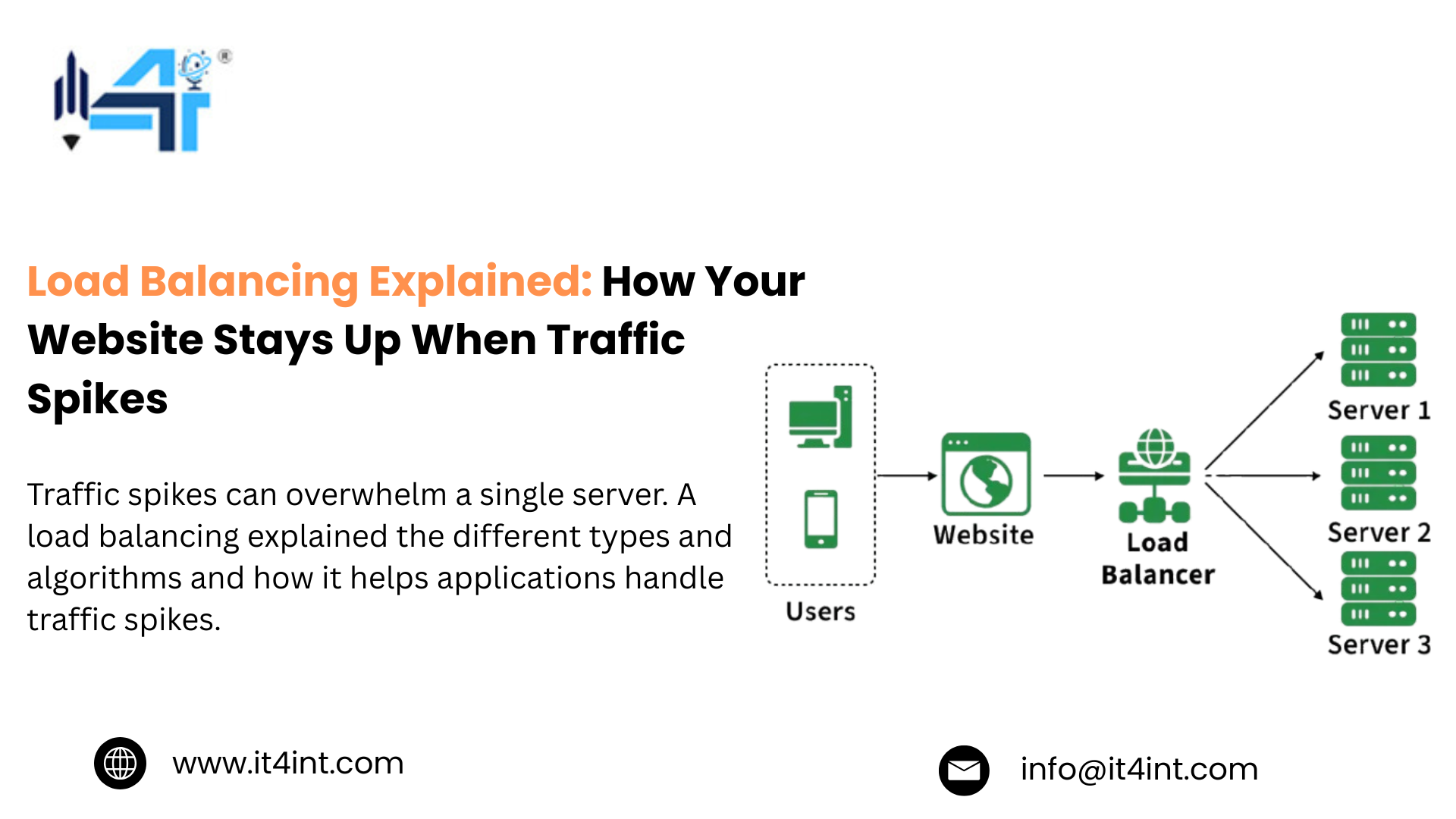
To understand how your website stays up when traffic spikes and how load balancing can help with that, it is essential to know what load balancing is. To begin with, load balancing is the process of distributing incoming network or application traffic across multiple servers or backend resources.
Additionally, a load balancer sits between users and the application’s backend infrastructure, receives incoming requests, and routes them to suitable resources. From a user’s perspective, load balancing explained is a pretty simple process. Where a request arrives, the load balancer evaluates the available backend resources, selects an appropriate target, and forwards the request.
So, a website experiencing a sudden campaign-driven spike can distribute requests across multiple application servers rather than concentrating demand on one machine.
How does a load balancer work?
In short, a load balancer receives the traffic, decides where it should go, and keeps monitoring the infrastructure behind it. While the process generally involves request reception, backend selection, health checking, traffic forwarding, and response delivery.
Here’s the process of a load balancer explained:
- A user sends a request
- The request reaches the laid balancer
- Available servers are evaluated
- A backend is selected
- The request is forwarded
- The response reaches the user
- Unhealthy servers can be taken out of rotation
This flexibility is what makes load balancing explained useful beyond basic traffic distribution. So a modern application can use routing rules and make intelligent traffic-management decisions and forward requests to the infrastructure responsible for serving them.
Why do websites need load balancing?
A major reason why websites need load balancing is because a website running on a single server has just a single point of dependency. And as a website grows, one server might struggle with simultaneous requests, unexpected traffic spikes, maintenance, or hardware and software failure.
Here are a few main reasons why businesses use load balancing:
- Handle traffic spikes
- Improve availability
- Reduce bottlenecks
- Support scalability
- Enable failover
- Improve resource utilisation
- Support maintenance
Apart from these, with load balancing explained, it does not automatically create capacity. The main objective is so that traffic can be distributed intelligently and infrastructure can continue serving users when individual components experience problems.
Power your growing business with IT4INT reliable infrastructure built for demanding workloads, with high performance, advanced security, and flexible configurations tailored to your needs. ORDER DEDICATED SERVER
What happens when traffic suddenly spikes?
When website traffic suddenly spikes, thousands of customers arrive within minutes, product pages are being loaded, searches are running, carts are being updated, and checkout requests are increasing simultaneously.
Here’s what happens to your website without sufficient capacity:
- CPU utilisation rises as servers process more requests
- Memory consumption increases as more connections and application processes remain active
- Network traffic grows as more data moves between users and backend systems
- Response times increase when resources become saturated
- Requests might fail or time out if the application reaches its limits
- User experience deteriorates as pages and transactions take longer to complete
However, a load balancer explained that it cannot create capacity out of thin air and that it can help applications respond more effectively to unpredictable demand. Having said that, there’s a critical limitation where load balancing does not make unlimited traffic possible. So if every backend server, database, API, or network component reaches its capacity, users can still experience performance problems.
Read More: SQL Database: Complete Guide to SQL Databases, Types & Uses
Frequently Asked Questions
Conclusion
In conclusion, a traffic spike and thousands of users arrive at once, a single backend can quickly become a bottleneck. Hence, the goal is not to just survive your next traffic spike but, as a modern business, to build an infrastructure alongside hosting providers like iT4iNT Servers that doesn’t panic when traffic suddenly gets bigger.
CTA
Not sure if you need load balancing?
Don’t wait until an overloaded server, failed requests, or downtime forces the conversation. Plan your scalable infrastructure with iT4iNT Server today!