Object Storage vs Block Storage vs File Storage: What’s Actually Different
As we know, there is no single storage type that wins every workload; choosing the right architecture becomes harder. Especially when object storage vs. block storage comes into the conversation. With your application storing millions of files, processing terabytes of analytics data, running a mission-critical database, and serving billions of media requests, the choice between object and block storage is just one part of a bigger storage decision.
Be it a database, an AI training pipeline, a video platform, or a virtual machine, they all interact with the data in fundamentally different ways. Having said that, modern applications are generating and moving enormous amounts of unstructured data. There are databases and transactional systems that demand predictable, low-latency I/O, whereas analytics, AI/ML, backups, media workflows, and cloud-native demand object storage. This means shared project files have different storage requirements, and trying to force all three workloads onto the same storage model can create unnecessary compromises. This also means modern businesses should not just choose storage based on a provider, product, or even price per gigabyte but rather focus on the workload to begin with.
While the differences between object storage vs. block storage might seem subtle, in production they have effects on latency, scalability, application design, operational complexity, and even cost. This blog helps you understand the same and gives you insight into where each type of storage performs best, where it falls short, and how you can choose the right one for your business needs.
What types of data do you need to store?
A major part of deciding which storage type fits the best is understanding what kind of data you are actually storing and how your application will use it. As not all data behaves the same way, you must have a storage architecture and map your workload across practical dimensions.
Here’s how to categorise the same:
| DATA TYPE | REQUIREMENTS | PREFERABLE STORAGE TYPE |
| Frequently updated database | Latency, IOPS, predictable performance | Block |
| Unstructured data | Scale, durability, metadata | Object |
| Semi-structured data | Filesystem access, permissions, sharing | File |
| Large datasets | Scale, retention, analytics access | Object |
There are modern platforms that often combine storage models, but once you know how your data is accessed, updated, shared, scaled, or retained, the storage decision becomes much more calculated.
Object vs block vs file: What’s the difference?
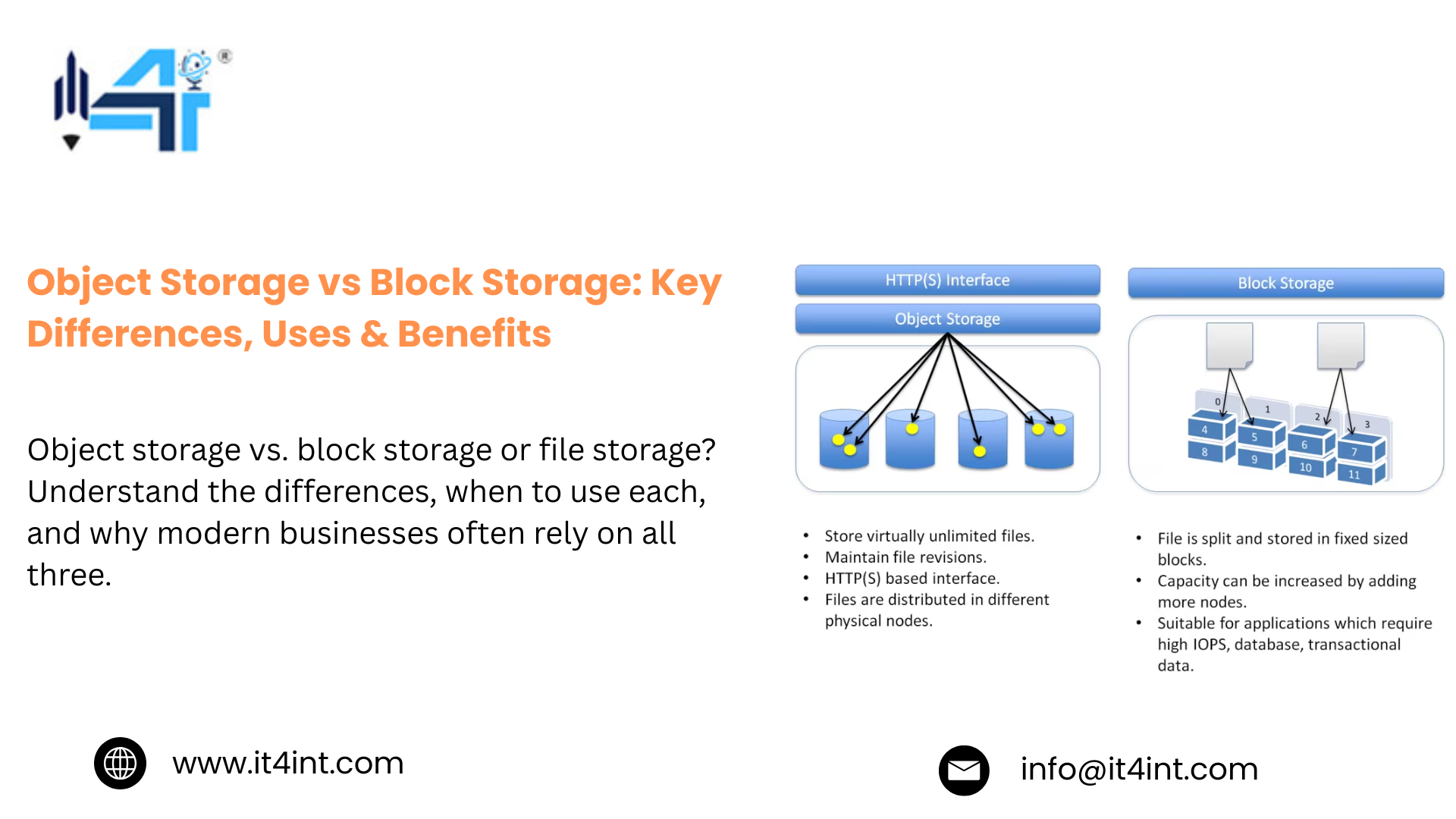
Once you have the kind of data you would be dealing with clearly, the next step is knowing the difference between object storage vs. block storage as well as file storage. By definition, object storage stores data as objects with metadata and a unique ID, which are a fit for large, unstructured data like images or videos. Whereas block storage stores data in fixed-size blocks, which are fast and are usually best for OS and databases. On the other hand, file storage organizes data in folders or directories, which are easy for users and applications to access and share.
However, the easiest way to understand the difference between all is to look at how the application itself does. Here’s a diagram of the same:
APPLICATION
┌─────────────┼─────────────┐
OBJECT BLOCK FILE
│ │ │
API / HTTP Block Device Filesystem
│ │ │
Objects Volumes Files/Folders
│ │ │
┌─────────┐ ┌─────────┐ ┌─────────────┐
│ Data Block 1 Projects
│ Metadata Block 2 app
│ Key Block 3 Data
└─────────┘ └─────────┘ └─────────────┘
Having said that, at a high level, object storage vs. block storage and file storage hold distinctions in how they organize data and how applications access it. And in most modern businesses, the most effective way is to use all three.
Power your growing business with IT4INT reliable infrastructure built for demanding workloads, with high performance, advanced security, and flexible configurations tailored to your needs. ORDER DEDICATED SERVER
Real-world storage architectures for modern businesses
As discussed, modern businesses often end up choosing all three kinds of storage. The most useful way to think about storage architecture is to start with the business workload, not just the storage product.
Here’s what approaches different modern businesses take with different workload requirements:
⦁ SaaS
Block storage for low-latency, granular I/O
⦁ AI/ML
Object storage for large-scale data
⦁ E-commerce
Block for transactions, objects for product media and analytics
⦁ Media
Object storage for scale and unstructured data
⦁ Healthcare
Block for databases, objects for imaging and backups, file for shared records
⦁ Enterprise
File storage when multiple systems need system access
Moreover, a single application can use several of these, as the goal is not to pick one storage type but rather to match each workload with the storage model that fits the best.
How to choose the right storage model?
The most important rule while choosing a storage type is to assess your workload behavior and not just the capacity.
Here’s a list of questions that you must look into while choosing between object storage vs. block storage:
⦁ How will the application access the data?
⦁ How performance-sensitive is the workload?
⦁ How large will the dataset become?
⦁ How long must the data be retained?
⦁ Does the data need to be shared across systems?
However, the final decision should not just depend on the storage capacity but also on latency, IOPS, throughput, access patterns, scalability, sharing, durability, retention, and total cost.
Read More: SQL Database: Complete Guide to SQL Databases, Types & Uses
Frequently Asked Questions:
Conclusion
In conclusion, there is no winner between object storage vs. block storage, as each model solves a different infrastructure issue. As a business, when you adopt AI, analytics, cloud-native applications, and distributed systems, iT4iNT Servers help in designing storage infrastructure around the workloads that is not only high-performance computing and scalable data storage but also suited for long-term data management.
CTA
Not sure which storage model fits your workload?
If your application is struggling with latency, I/O performance, capacity, or scalability, iT4iNT Server can help you design an infrastructure strategy with the right approach for each workload.